


Two Easy Ways to Start Earning Rewards!
Become a member today! Members-only pricing and offers, personalized care notifications, Vital Care points back on every purchase and more!
 Become a credit card member today!
Earn 2X Pals Rewards points at Petco
when you use Petco Pay!APPLY NOWLearn More About Petco Pay Benefits
How to Buy Veterinary Diets at Petco: In-Store and Online Guide
Updated on November 18, 2026

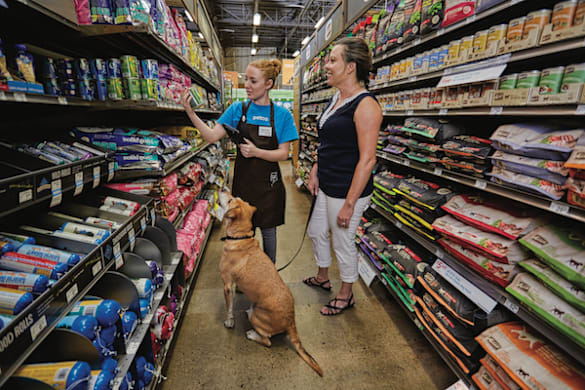
Learn how easy it is to pick up vet-approved diets with Petco
When your vet recommends a veterinary diet to support your pet’s health, Petco is here to help make getting the food they need easy. Shop online, pick up in store, or stop by your neighborhood Petco. We accept veterinary diet prescriptions from any vet, whether they’re part of Petco or an independent practice. Explore the options below to find the best way to get your pet the nutrition they need.
What You Need to Get Started with Buying a Veterinary Diet
Veterinary diets (also called prescription or therapeutic diets) require authorization from a licensed veterinarian. Regardless of which option you choose, have these ready:
- A valid veterinary diet prescription from a licensed veterinarian who has examined your pet. Book an appointment here if you need one.
- Your pet's name, species, and weight
- Your veterinarian's name, clinic name, and phone number
- A Petco account (free to create at petco.com). This is where you'll manage refills, track orders, and earn Petco Perks points on your veterinary diet purchases.
Online veterinary diet prescriptions are verified in partnership with Vetsource, our trusted veterinary pharmacy partner.
Option 1: Buy Online, Pick Up in Store (Fastest & Easiest)
Need your pet's food today, or prefer to skip shipping? Buy online, pick up in store is available for veterinary diet products at select stores.
- Add your pet's veterinary diet to your cart at petco.com and select in-store pickup at your preferred Petco. If your pet’s Vet Diet is not available at your preferred Petco location, search by nearby ZIP codes to find the nearest Petco that carries your pet’s prescription diet.
- At checkout, upload a photo of your prescription and enter your pet and vet's information so our team can verify it.
- Once your prescription is verified and your order is ready, you'll receive a notification to pick it up. This may take up to 3 hours and is dependent on store hours. Orders placed on Sunday will be available for pickup on Monday.
Tip: Some Petco locations don't have veterinary staff on site. At these stores, veterinary diets are available for pickup only, so you'll need to place your order online. Our medical team will verify your prescription remotely, and your order will be ready for pickup at the store. Check your local store's details at petco.com before you go.
Option 2: Order Online and Upload a Photo or PDF of Your Prescription (Fastest)
If you have a written veterinary diet prescription in hand, this is the quickest way to get your order approved.
- Find your pet's veterinary diet at petco.com and add it to your cart.
- At checkout, choose to upload a photo or PDF of your prescription.
- Take a clear photo that shows your pet's name, the prescribed diet, your veterinarian's name and signature, and the date.
- Place your order. Vetsource typically verifies uploaded prescriptions the same day, with no additional vet approval needed.
- Choose buy online, pick up in store for fast fulfillment, or have it shipped to you home.
Good to know: Photo uploads are available for veterinary diet products only. Prescription medications are verified directly with your veterinarian.
Option 3: Order Online and Let Petco Contact Your Vet
Don't have a written prescription? No problem. We'll reach out to your vet for you.
- Find your pet's veterinary diet at petco.com and add it to your cart.
- Enter your pet's information and your veterinarian's contact details at checkout. If you are a Petco veterinary services customer, select the correct Vetco Total Care hospital or Vetco Vaccination Clinic location.
- Place your order. Vetsource will contact your veterinarian directly to verify the prescription. You don't need to do anything extra.
- Once your vet approves (typically 2–4 business days), your order ships and arrives within 5–7 days.
Option 4: Buy In-Store at Your Local Petco
Prefer to shop in person? How you buy in store depends on whether this is your first veterinary diet purchase at Petco.
First-time veterinary diet purchase
- Bring your veterinary diet prescription to a Petco location with a Vetco Total Care hospital or a store general manager on site.
- Show your prescription to a Vetco Total Care team member or the store general manager to validate it.
- Once validated, you'll receive a Petco veterinary diet card, so future purchases are quick and easy.
Returning customers
- Bring your physical Petco veterinary diet card, or open the digital card in your Petco app.
- Show it to your cashier at checkout to scan.
Your veterinary diet card is not limited by number of refills. It can be used for every purchase until your prescription's expiration date.
Before you go: Not every Petco location sells veterinary diets for in-store purchase. Call your local store or search for availability by zip code on petco.com first. If your store offers veterinary diets for pickup only, place your order online using Option 3.
Option 5: Visit a Vetco Total Care or Vetco mobile clinic to receive a Vet Diet prescription
Need a new prescription or can't wait on your vet's approval? Petco veterinarians can write prescriptions for Rx food or veterinary diets. Vetco Total Care hospital and Vetco Vaccination Clinic prescriptions automatically transfer to your Petco profile, so you can buy online or in store right away.
Vetco Total Care Hospital
- Schedule a visit at your nearest Vetco Total Care Hospital online here or through the Petco app.
- Discuss your pet’s dietary and wellness needs with your Petco Veterinarian so the vet can write the appropriate prescription.
- Take home your pet’s first bag of veterinary diet food.
- Your new prescription is automatically linked to your Petco account—no extra steps or verification required for your future orders within the prescription expiration.
- Order future refills online or in-store right away with Autoship to ensure your pet always has what they need.
Vetco Vaccination Clinics
- Schedule a visit at your nearest Vetco Vaccination Clinic online here or through the Petco app.
- Vaccination Clinics have a limited assortment – they primarily prescribe vet diets and flea and tick medication. Discuss your pet’s dietary and preventative needs with your Petco Veterinarian so they can write the appropriate prescription.
- Take home your pet’s first bag of veterinary diet food that day. Select stores carry vet diet, so if the clinic doesn’t have your product, they will help you ship to your home.
- Your new prescription is automatically linked to your Petco account—no extra steps or verification required for your future orders within the prescription expiration.
- Order future refills online or in-store right away with Autoship to ensure your pet always has what they need.
Your veterinary diet prescription will create a digital vet diet card on the Petco app. You can scan this every time you need a refill in store. Your veterinary diet card is not limited by number of refills. It can be used for every purchase until your prescription expiration date.
How Can You Manage Your Pet's Veterinary Diet Refills?
Once your prescription is on file with Petco, keeping your pet on track is simple:
- Log in to your Petco account on the app or website and go to My Pet Prescriptions to view your prescription and reorder.
- Set up Autoship at checkout to save 35% on your first order and have your pet's food delivered automatically on a schedule, so you never run out.
- Earn Petco Perks points on every veterinary diet purchase, online and in store.
- If your prescription is about to expire, Petco will reach out with next steps. A quick call to your vet or a Vetco visit can get you a renewed prescription.
A Few Helpful Things to Know
- Always follow your veterinarian's guidance when starting or switching your pet to a veterinary diet.
- Keep your digital veterinary diet card handy in the Petco app so checkout is fast every time.
- If you have questions about your pet's diet, your Vetco vet or the Petco Pharmacy team is happy to help.
- New to Petco? Creating an account at petco.com takes just a few minutes and makes managing your pet's prescriptions, orders, and delivery schedule much easier.
When to Check in With Your Veterinarian?
Most prescriptions require an annual visit to ensure the product is still appropriate for your pet. Your Petco veterinarian can prescribe a veterinary diet at your pet's appointment. Vetco Total Care hospital and Vetco Vaccination Clinic prescriptions automatically transfer to your Petco profile, so you can buy online or in store right away. If you're not a Petco veterinary customer, it's still easy after you check in with your vet: upload a photo of your veterinary diet prescription or select contact my vet at checkout. Set up Autoship and earn Petco Perks points, so staying on track with your pet's nutrition is one less thing to think about.